
SQS to Step Functions: Pipes vs. Lambda, and Where Failed Messages End Up
You have an SQS queue, and each message should start a Step Functions workflow. There are two common ways to connect them: an EventBridge Pipe, or a small Lambda function in between. Both work in a demo. The difference shows up when a message fails.
So this post follows one question: where does a failed message end up? In the dead-letter queue? In a separate error queue? Or nowhere, because SQS has already deleted it?
To answer it, I built nine scenarios in one CDK stack. I sent the same test messages through all of them. Some work, some always fail, some fail twice and then work, and some are slow. This post shows what happened, with the numbers from the test runs.
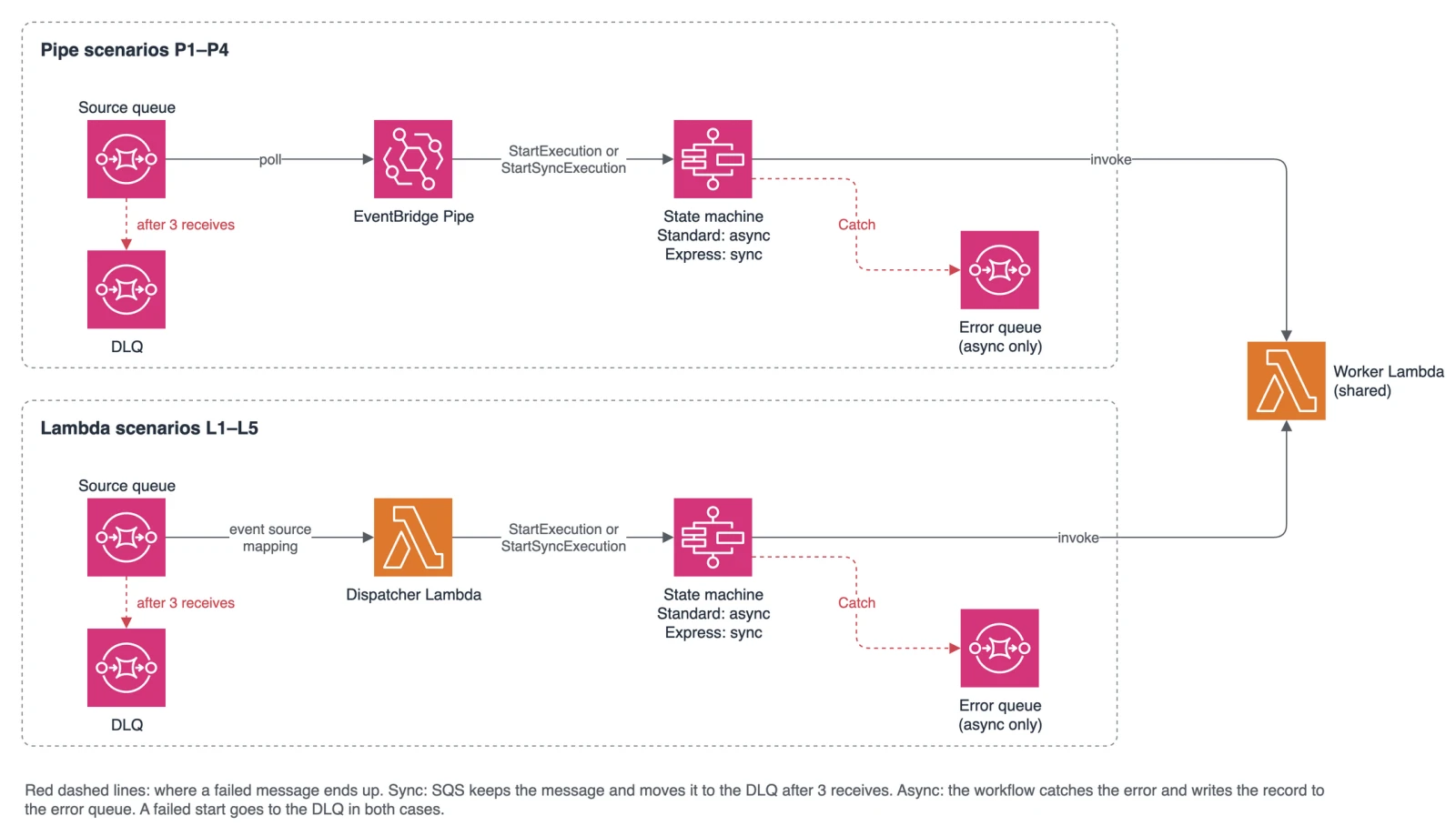
The Basics: Async or Sync
SQS deletes a message only when the consumer reports success. A Pipe and a Lambda event source mapping both work this way. The event source mapping is the part of Lambda that polls a queue and calls your function. Both hand over a batch and delete the messages after a successful call.
What “successful” means depends on how the workflow starts:
- Async (
StartExecution): the call returns as soon as the execution has started. SQS deletes the message. The workflow then runs on its own. - Sync (
StartSyncExecution): the call waits until the execution ends. Only then does SQS delete the message, or keep it.
Step Functions has two workflow types, and they do not support the same calls:
| Standard | Express | |
|---|---|---|
| Start async | Yes | Yes |
| Start sync | No | Yes |
| Maximum run time | 1 year | 5 minutes |
| Execution history in the console | Yes | Only with logging on (read from CloudWatch Logs) |
From this follows one rule for error handling. It shaped every workflow in the repo:
Whoever still holds the message handles the error.
- Sync (Express): SQS still holds the message while the workflow runs. So the workflow simply fails. SQS delivers the message again after the visibility timeout, the time a received message stays hidden from other consumers. After three receives, SQS moves it to the dead-letter queue (DLQ). The workflow has no retry. A batch workflow catches errors only to report which records failed (see The Workflows).
- Async (Standard): SQS has already deleted the message. Nobody else will retry it. So the workflow retries on its own, catches all other errors, and sends the record to an error queue. It still ends as
FAILED, so the failure shows up in the console and in theExecutionsFailedmetric. Only a failed start still reaches the DLQ, because then SQS keeps the message.
This is the sync path for a message that fails:
sequenceDiagram
    participant Q as Source queue
    participant P as Pipe or Lambda
    participant S as Express workflow
    participant D as DLQ
    Q->>P: message (receive 1)
    P->>S: StartSyncExecution
    S-->>P: FAILED
    Note over Q: message stays, invisible until the visibility timeout ends
    Q->>P: message (receive 2)
    P->>S: StartSyncExecution
    S-->>P: FAILED
    Q->>P: message (receive 3)
    P->>S: StartSyncExecution
    S-->>P: FAILED
    Q->>D: moved after 3 receives (maxReceiveCount = 3)
The Nine Scenarios
Four scenarios start the workflow with a Pipe (P), five with a dispatcher Lambda (L). L3 and L4 differ only in how they start the executions.
| Starts with | Workflow | Call | Batch size | Per execution | |
|---|---|---|---|---|---|
| P1 | Pipe | Standard | async | 1 | 1 message |
| P2 | Pipe | Standard | async | 10 | batch, Map state |
| P3 | Pipe | Express | sync | 1 | 1 message |
| P4 | Pipe | Express | sync | 10 | batch, Map state |
| L1 | Lambda | Standard | async | 10 | 1 message, execution name = messageId |
| L2 | Lambda | Standard | async | 10 | batch, Map state |
| L3 | Lambda | Express | sync | 10 | 1 message, one after the other |
| L4 | Lambda | Express | sync | 10 | 1 message, in parallel with aioboto3 |
| L5 | Lambda | Express | sync | 10 | batch, Map state |
With batch size 10, the poller waits up to 5 seconds to fill a batch. This wait is the batching window. The dispatcher Lambdas always get batches of up to 10, also when they start one execution per message.
Two combinations are left out. Standard + sync does not exist: StartSyncExecution works only for Express. You could start a Standard workflow and poll DescribeExecution, but that is a different pattern. Express + async behaves like Standard + async from the view of SQS.
Why not Express async?
For SQS, an async Express start is the same as an async Standard start. SQS deletes the message as soon as the execution has started. Express then adds limits on top. An async Express execution runs at least once, not exactly once. It keeps no execution history outside CloudWatch Logs, and it may run for 5 minutes at most. For work that SQS no longer tracks, Standard is the safer choice.
Fan-out without Lambda
A Pipe does not split a batch into many executions. It sends the whole batch to one execution. As a workaround, the Pipe can send to an EventBridge event bus, and a rule starts one execution per event. This works only async. Failed starts then land in the DLQ of the rule, not in the DLQ of the source queue. I left this out of the matrix.
Setup
All scenarios live in one repository, each with its own source queue, DLQ and state machine. The README explains how to deploy them and run the test scripts.
The visibility timeout must cover the time a message is in flight. For the sync Pipes, it is 6 minutes, because an Express execution may run for 5 minutes. For the dispatcher Lambdas, AWS recommends 6 times the function timeout plus the batching window.
Test Messages
A field in the message body tells the worker Lambda what to do. Besides ok, there are three cases:
failis a poison message. It fails on every attempt.transientfails on attempts 1 and 2 and works on attempt 3. The attempt counts both a workflow retry and an SQS redelivery, sotransientcan succeed in both paths.slowsleeps, for exampleslow:30for 30 seconds.
Scripts in the repo send one message per case and show the queue counts, the executions and the logs.
The Workflows
The repo builds four workflows: Standard or Express, single or batch. They follow the rule from above:
- Async (Standard): The workflow retries
TransientErrortwice, after 2 and 4 seconds. It catches all other errors and writes the record and the error to the error queue. AFailstate then ends the execution asFAILED. - Sync (Express) with a batch (P4, L5): The workflow catches errors per record, but only to mark the record as failed. Its last state reports a partial batch failure:
{"batchItemFailures": [{"itemIdentifier": "<messageId>"}]}. This is the same format that Lambda uses.
A Pipe reads this list from the workflow output on its own. L5 passes it on as the Lambda response. SQS then deletes the successful records and keeps only the failed ones.
So the nine scenarios share four workflows. The state names are the ones in the repo:
flowchart TB
    s1["ProcessMessage<br/>retry TransientError 2x"] -->|ok| s2(["SUCCEEDED"])
    s1 -->|"catch: all errors"| s3["SendToErrorQueue"]
    s3 --> s4(["MessageFailed: FAILED"])
flowchart TB
    subgraph map["Map: per record"]
        b1["ProcessMessage<br/>retry TransientError 2x"] -->|"catch: all errors"| b2["SendToErrorQueue"]
    end
    map --> b3{"AnyRecordFailed"}
    b3 -->|yes| b4(["RecordsFailed: FAILED"])
    b3 -->|no| b5(["SUCCEEDED"])
flowchart TB
    e1["ProcessMessage<br/>no retry, no catch"] -->|ok| e2(["SUCCEEDED"])
    e1 -->|error| e3(["FAILED, SQS delivers again"])
flowchart TB
    subgraph map["Map: per record"]
        x1["ProcessMessage<br/>no retry"] -->|"catch: all errors"| x2["MarkFailed"]
    end
    map --> x3["BuildBatchResponse"]
    x3 --> x4(["SUCCEEDED<br/>with batchItemFailures"])
Option 1: EventBridge Pipes (P1–P4)
A Pipe connects the source queue to the state machine without any code of your own. Its invocation type decides between sync and async: REQUEST_RESPONSE calls StartSyncExecution, FIRE_AND_FORGET calls StartExecution. Standard workflows accept only FIRE_AND_FORGET. The Pipe writes failed target calls to a log group.
In CDK, the Pipe constructs are still alpha (@aws-cdk/aws-pipes-alpha), so I pinned them to an exact version. The Pipe construct in the repo shows the full setup.
A Pipe always sends a JSON array to the state machine, even with batch size 1. So a workflow for single messages must accept an array with one record. It should fail on more than one record: taking only the first would drop the others, and SQS would delete them.
Results
I sent ok, fail and transient to each Pipe scenario at the same time.
ok | fail | transient | |
|---|---|---|---|
| P1 | SUCCEEDED | FAILED, record in the error queue, DLQ empty | SUCCEEDED on attempt 3, by workflow retry |
| P2 | SUCCEEDED | FAILED (“1 of 1 records sent to the error queue”) | SUCCEEDED, by retry in the Map item |
| P3 | SUCCEEDED | FAILED on every receive (11:25, 11:31, 11:37), then DLQ | SUCCEEDED on receive 3 |
| P4 | batchItemFailures: [] | in batchItemFailures each time, then DLQ | SUCCEEDED on receive 3 |
The results match the rule. In the async scenarios, the DLQ stays empty, because every start worked. In the sync scenarios, SQS does the retries and moves the poison message to the DLQ.
What else the test runs showed:
- A batch size of 10 does not mean one batch. Three messages sent in one
SendMessageBatchcall arrived as two batches in P2 and as three in P4. With 10 messages, the Pipe made 4 batches of 1 to 5 records. Only with 50 messages did 3 of the batches have 10 records. A batch workflow must handle any size from 1 to 10. - The batching window costs time when a batch does not fill up. With batch size 1, the execution started in less than a second. With batch size 10 and a 5-second window, a batch with fewer than 10 messages started 7.5 to 20 seconds after the message was sent, often after about 20 seconds. Full batches of 10 started at once.
- Batch size 1 does not mean one after the other. In P3, four executions started in the same second.
- The 5-minute limit is real. I sent two slow messages to P3 and P4, one just under the Express limit and one just over it. The first kept the worker busy for 4 minutes 50 seconds and worked. The second should have taken 5 minutes 10 seconds. Its Express execution ended after exactly 5:00 with
States.Timeout. The Pipe treated this as a failed call, and SQS delivered the message again. After three receives, a healthy but slow message was in the DLQ. - The Pipe log does not show the cause. A failed call shows up as
TargetInvocationFailed, a batch with failed records asTargetInvocationPartiallyFailed. The message only says “encountered an error while processing event(s)”. The real error is only in the Express log. - A batching window makes Pipe retries slower. Redelivery in P4 took 7 to 8 minutes, not the 6 minutes of the visibility timeout. The Pipes documentation explains this. With a batching window, the Pipe sets its own visibility timeout: 7 minutes, plus the window, plus 30 seconds. The Lambda event source mapping kept the visibility timeout of the queue. If you need fast retries through a Pipe, do not set a batching window.
Option 2: A Dispatcher Lambda (L1–L5)
Here an event source mapping hands a batch to a small Lambda, and the Lambda starts the workflow. The event source mapping needs reportBatchItemFailures. Without it, Lambda ignores the batchItemFailures in the response. The call counts as a success, so SQS deletes the whole batch, failed records included.
L1: The Execution Name as a Duplicate Check
A Pipe cannot set the execution name. A Lambda can. The L1 dispatcher uses the messageId as the name. A Standard execution name stays taken for 90 days. If SQS delivers the message again, the start fails with ExecutionAlreadyExists, and the dispatcher counts this as success. Any other error reports only this record as failed.
To test it, I called the L1 dispatcher twice with the same messageId, but with a different receiptHandle and receive count. Both calls returned {"batchItemFailures": []}, and there was exactly one execution.
This only covers a message that SQS delivers twice. If the producer sends the same data twice, the messages have different IDs. L2 starts the whole batch without a name, so it can start a batch twice, just like P2.
Sync Calls: Check the Status
StartSyncExecution does not raise an error when the execution fails. Only the status in the response tells you. So every sync dispatcher checks the status and reports the messageId in batchItemFailures. L5 starts one execution with the whole batch and passes the batchItemFailures of the workflow through. If that execution itself fails, all records go back.
Results: Same as the Pipes
The Lambda scenarios gave the same results as the matching Pipe scenarios. L1 and L2 behaved like P1 and P2, L3 and L4 like P3, and L5 like P4. The event source mapping also split small batches, like the Pipe. Its records have the same fields as the records from a Pipe, down to attributes. So both options can share the same workflows.
L2 and L5 bring nothing new. They only add more parts to build and run.
Deep Dive: Loop or Parallel (L3 vs. L4)
L3 and L4 start one sync execution per record. L3 does this in a loop. The L4 dispatcher starts them in parallel with aioboto3, at most 10 at the same time. Its client waits up to 310 seconds for a response, because an Express execution may run for 5 minutes.
The slow Test
I sent ten messages to L3 and to L4, each keeping the worker busy for 30 seconds. The dispatcher timeout is 1 minute. So the test shows whether a dispatcher can wait for all executions of a batch before it times out.
| L3 (one after the other) | L4 (in parallel) | |
|---|---|---|
| Batches from the event source mapping | 4 or 5 per receive, 13 in total | 5 (1, 2, 2, 4 and 1 records) |
| Time per batch | 60 s and a Lambda timeout (10 of 13 calls) | 30 to 32 s |
| Executions | 23 for 10 messages, all SUCCEEDED | 10, all SUCCEEDED |
| End | 7 of 10 messages in the DLQ | all 10 deleted |
L3 is worse than slow. When the Lambda times out, it never returns its batchItemFailures. So SQS gets the whole batch back, including the records whose executions already worked. Those run again on the next receive. In the end, 10 healthy messages ran 23 times, all successfully, and 7 of them still landed in the DLQ. Only batches with a single record finished in time.
Every dispatcher that starts sync executions needs one rule: the Lambda timeout must cover the run time. For L3, that is the sum of all executions in a batch. For L4, it is the longest single execution. L4 needs much less time, but a single message that takes 90 seconds would hit the same 1-minute timeout.
Throughput: Pipe vs. Lambda
Does the dispatcher Lambda also help with throughput? I sent 200 messages to P3 and to L4 at the same time. Each one kept the worker busy for 10 seconds. Then I measured the executions from the workflow logs.
| P3 (Pipe, batch size 1) | L4 (Lambda, batch size 10) | |
|---|---|---|
| Executions | 200, all SUCCEEDED | 200, all SUCCEEDED |
| First start to last end | 37.3 s | 25.5 s |
| Most at the same time | 105 | 180 |
| Starts per 10 seconds | 45, 77, 78 | 180, 20 |
The Pipe scales up step by step. The event source mapping delivered full batches at once: 19 of 23 batches had 10 records. L4 started 10 executions from each of them. So L4 handles a burst faster. This was one run with one burst. I did not measure a steady load.
L4 has two costs. The Lambda pays for the time it waits for the executions, while a Pipe is billed per request. Per million messages that run for 10 seconds each, the Pipe costs about $0.46 and the L4 dispatcher about $1.70. These are list prices in eu-central-1, with 128 MB on arm64 and full batches of 10. The Express executions cost about $11 in both cases, so the integration is a small part of the bill. And aioboto3 makes the cold start slower. It took 1150 to 1410 ms, compared to 650 to 800 ms for the boto3 dispatchers. All dispatchers use the same code bundle.
Error Handling Compared
The table puts all results side by side:
fail ends up in | transient | Partial batch failure | |
|---|---|---|---|
| P1, L1 | error queue, execution FAILED | fixed by workflow retry (seconds) | no batch |
| P2, L2 | error queue, only the failed record | fixed by retry in the Map item | Yes, in the workflow |
| P3, L3, L4 | DLQ after 3 receives | fixed on receive 3 (12 minutes) | L3 and L4 report per record |
| P4, L5 | DLQ after 3 receives | fixed on receive 3 | Yes, batchItemFailures |
Four things matter more than I expected.
1. Retry speed. In the sync path, only SQS retries, and it waits for the visibility timeout. That timeout must be longer than an execution may run, here 6 minutes. So transient took 12 minutes in P3. In the async path, the workflow retries after 2 and 4 seconds.
2. Monitoring. In P4 and L5, the Express execution ends as SUCCEEDED even when records fail. ExecutionsFailed stays at 0. Failed records only show up in the Pipe log (P4) or the dispatcher log (L5), and later in the DLQ. So the alarm belongs on the DLQ depth.
In the async path, there are two places to watch. A failed start sends the message to the DLQ. A failed workflow sends the record to the error queue. I saw the first case with a message larger than the 256 KiB input limit of Step Functions. In P1 and L1, the start failed, and the message went to the DLQ.
3. Redrive. In the sync path, the DLQ holds the original message. An SQS redrive (start-message-move-task, or one click in the console) moves it back to the source queue.
In the async path, the record sits in the error queue, wrapped as {record, error}. SQS refuses to redrive from it: “Source queue must be configured as a Dead Letter Queue”. You need a script that unwraps the record and sends it to the source queue again.
RedriveExecution does not help either, at least not with this pattern. It restarts the execution at the failed state, which is the Fail state after the catch. A Fail state fails again on redrive, as the redrive documentation says. In P1, the redriven execution ended as FAILED again at once, and the worker did not run.
The repo uses the catch. The table compares it with a workflow without a catch:
Catch, error queue, then Fail | No catch | |
|---|---|---|
| Record kept outside the execution | Yes, in the error queue | No, only in the execution history |
Alarm on ExecutionsFailed | Yes | Yes |
RedriveExecution runs the worker again | No (tested) | Yes, for 14 days¹ |
¹ From the redrive documentation, not tested: the redrive restarts at the failed state, which is then the worker task.
4. Duplicates. A timed-out dispatcher (L3) sends records back that already worked. SQS itself delivers at least once. So the workflows should be idempotent in both paths, not only in the async one.
Pipe vs. Dispatcher Lambda
| Pipe | Dispatcher Lambda | |
|---|---|---|
| Code of your own | No | Yes |
| Partial batch failure | Yes | Yes, with reportBatchItemFailures |
| Set the execution name | No | Yes |
| Many parallel executions from a burst | Partial² | Yes |
| Error cause in its own log | No³ | Yes |
| Stable CDK constructs | Partial⁴ | Yes |
² The Pipe scales up step by step: 105 at the same time in the test, compared to 180 for L4. ³ The Pipe log names no cause. The cause is in the Express log. ⁴ The CDK modules for Pipes are still alpha.
Which One Should You Use?
This is the decision tree after the tests:
flowchart TD
    Q1{"Keep the message in the queue<br/>until the workflow is done?"}
    Q1 -->|"yes: sync, Express"| Q2{"Under 5 minutes per message<br/>or per batch?"}
    Q1 -->|"no: async, Standard"| Q5{"One execution per message?"}
    Q2 -->|no| Q5
    Q2 -->|yes| Q3{"One execution per message?"}
    Q3 -->|no| P4["P4: Pipe to Express, Map<br/>alarm on DLQ depth"]
    Q3 -->|yes| Q4{"Must bursts run in parallel at once?"}
    Q4 -->|no| P3["P3: Pipe to Express"]
    Q4 -->|yes| L4["L4: Lambda to Express, in parallel"]
    Q5 -->|no| P2["P2: Pipe to Standard, Map"]
    Q5 -->|yes| Q6{"Must the start itself<br/>be deduplicated?"}
    Q6 -->|no| P1["P1: Pipe to Standard"]
    Q6 -->|yes| L1["L1: Lambda to Standard<br/>execution name = messageId"]
L2, L3 and L5 are not in the tree. L2 and L5 do the same as P2 and P4, only with code of your own. L3 does the same as L4, but slower, and it can run into its timeout.
The first question is a trade-off. Sync gives you SQS retries and a redrive with one click, but the retries are slow. Async gives you fast retries in the workflow. But you build the error queue and the way back to the source queue yourself.
My conclusion: the Pipe is the default. It needs no code, it has the same error semantics, and partial batch failure works. A dispatcher Lambda is worth it only when you must control the start itself.
Limitations and Trade-offs
- Small tests. Each test ran once, in one region (eu-central-1), with a few to a few hundred messages. The throughput test was one burst, not a steady load.
- The dispatcher timeout is 1 minute on purpose. It makes the L3 problem visible. L5 would need a timeout a bit over 5 minutes to cover a full Express execution.
- The worker timeout equals the Express limit (5 minutes). So a slow message ends with
States.Timeoutand no cause. A worker timeout a bit shorter would report the Lambda error instead. - The error queue keeps the whole SQS record, including the
receiptHandle, which has no use there. - Message size. SQS accepts messages up to 1 MiB since August 2025. Step Functions accepts at most 256 KiB of input. A large message cannot start a workflow, and a batch of medium-sized messages may not fit either.
- Throttling. I did not run a load test for it. According to the Step Functions quotas,
StartSyncExecutionhas no fixed quota and scales on demand. A sudden surge may still be throttled until capacity is available.StartExecutionfor Standard has a bucket of 800 and a refill of 150 per second in eu-central-1. - Costs. The cost figures are list prices without the free tier, not a measured bill.
Wrapping Up
Where a failed message ends up depends on one choice: does the workflow start sync or async?
- Sync (Express): SQS keeps the message until the workflow ends. It retries and moves poison messages to the DLQ. So the workflow needs no retry of its own. A workflow for one message simply fails. A batch workflow reports its failed records in
batchItemFailures. - Async (Standard): SQS deletes the message at the start. The workflow must retry, catch and keep failed records itself, and you need a script to bring them back.
- Pipes are the default. They behave like the dispatcher Lambdas, with less code.
- Use a dispatcher Lambda for a duplicate check with the execution name, or for bursts that must start many executions at once. Start sync executions in parallel, and make the Lambda timeout cover their run time.
- Watch the right signal. Batch workflows succeed even when records fail, so alarm on the DLQ depth. In the async path, watch the error queue too.
View the code on GitHub. The README explains how to deploy the stack and run the test scripts.
Further reading:
- Amazon EventBridge Pipes batching and concurrency — AWS documentation
- PipeTargetStateMachineParameters — AWS API reference
- Handling errors for an SQS event source in Lambda — AWS documentation
- Step Functions service quotas — AWS documentation
- Redriving executions in Step Functions — AWS documentation
- aioboto3