
Serverless Python Microservices on AWS: My Reference Architecture
A new project on AWS starts with the same questions every time. How many repos? How do I cut the services? Where does auth live? How do the services talk to each other? And how do I deploy all of it without losing data?
I have built the same answer in several projects now. Some parts of it come from problems: deploys that CloudFormation blocked, a request that ran into the API Gateway timeout, and services that were cut too small.
This post describes that setup: a Python backend with one service per business area, React or Angular in the frontend, and AWS CDK for the infrastructure. For each part, it answers one question: what did I decide, and why?
The Setup at a Glance
| Area | My default | Exception |
|---|---|---|
| Service boundaries | One service per bounded context | The contexts aren’t clear yet: start with fewer, larger services |
| Repos | One backend monorepo with the IaC code, one frontend repo | None |
| Python packages | uv workspace: domain and infra package per service, one package per Lambda | Several Lambdas run the same multi-step use case: add an application package |
| API | One Lambdalith per service with the Powertools router | Cloud-agnostic: FastAPI with Lambda Web Adapter. Steady load or long sync answers: ALB + ECS Fargate |
| API Gateway | One per service, behind the frontend’s CloudFront | The customer requires it: private API for internal calls |
| Heavy work | Async through SQS or Step Functions | The answer must come in the same request: ECS Fargate |
| Between services | Events on an EventBridge custom bus | Too much data to copy: sync call with IAM auth |
| Auth | One Cognito user pool, ID token, custom attributes checked per endpoint | OAuth scopes per endpoint: access token |
| File uploads | Straight to S3 with identity pool credentials | None |
| Data | DynamoDB | Open query patterns: Aurora PostgreSQL |
| Stacks | Shared, stateful, stateless; references through SSM | None |
| Accounts | One per stage, one shared dev stage | None |
Service Boundaries: One per Bounded Context
In one project, the services were too small. They called each other all the time, and we had to copy more and more data between them through events. In the end, we merged them back into one service.
Since then, one service covers one bounded context: a business area with its own language and its own data, for example orders or billing. A service owns its tables and buckets, and other services don’t read them directly. If the contexts aren’t clear yet, I start with fewer, larger services and split one only when there is a concrete reason.
Repos: One Backend Monorepo, One Frontend Repo
The backend and its infrastructure code live in one repo. A change to a Lambda function and the matching change to its stack go into the same pull request. I use AWS CDK; with Terraform, the same idea works with separate states.
The frontend has its own repo. Micro frontends would split it further, but in most of my projects they aren’t worth it.
Python Packages: A uv Workspace with Hexagonal Services
The backend is one uv workspace, but not one big package. The root pyproject.toml only lists the members. Every package below it has its own pyproject.toml with only the libraries it needs: the domain package, the infra package, and each Lambda function.
backend/├── pyproject.toml # workspace root: lists the members only├── contracts/│ └── pyproject.toml # pydantic├── services/│ ├── orders/│ │ ├── order_service_domain/│ │ │ └── pyproject.toml # pydantic, contracts│ │ ├── order_service_infra/│ │ │ └── pyproject.toml # boto3, order_service_domain│ │ └── functions/│ │ ├── api/ # the Lambdalith│ │ │ └── pyproject.toml # powertools, domain, infra│ │ └── export_worker/ # an SQS consumer│ │ └── pyproject.toml # domain, infra│ └── billing/│ └── ...└── cdk/ # shared, stateful and stateless stacksEach service follows the hexagonal style:
order_service_domainholds the models, the business rules, the ports and the use cases. Ports are the interfaces the domain needs, for example “save an order”. This package knows nothing about AWS.order_service_infraholds the adapters that implement the ports, for example the DynamoDB repository. Here,inframeans these adapters, not the CDK code.
Most use cases belong to one Lambda function and stay in the domain package. If several functions run the same multi-step use case, it moves into a third package, order_service_application. PyTestArch can check that the domain never imports the adapters.
The split also keeps the tests simple. Domain tests run without AWS, with simple fakes for the ports. Adapter tests run against moto or LocalStack, without a deploy. After each deploy, end-to-end tests send real requests with a Cognito test user.
Because each package lists only its own libraries, the deployment of a Lambda function contains only its own dependencies and the local packages it uses. Its handler creates the adapters and passes them to the use cases. I described this packaging in AWS Lambda Packaging with Python and uv.
That post also explains why I don’t use Lambda Layers. One of the blocked deploys came from a shared layer that one stack exported and others imported. Each new layer version changes the export, and CloudFormation refuses to change an export that another stack still uses.
The API: One Lambdalith per Service
Each service has one Lambda function for its whole API, a so-called Lambdalith. I prefer the event handler from Powertools for AWS Lambda for the routing. If the customer wants to stay cloud-agnostic, I use FastAPI with the AWS Lambda Web Adapter. Then the same app also runs on ECS Fargate without code changes.
One function per service works because the endpoints of a service need the same things: the same tables, VPC settings, secrets and IAM permissions. It also makes the OpenAPI definition easy, because one app knows all routes. If the endpoints of a service need very different permissions, network settings or secrets, I split the function.
For local development with FastAPI, I run the app with uvicorn against the dev stage. With the Powertools router, I don’t run a local server: the tests and a deploy to the dev stage take its place.
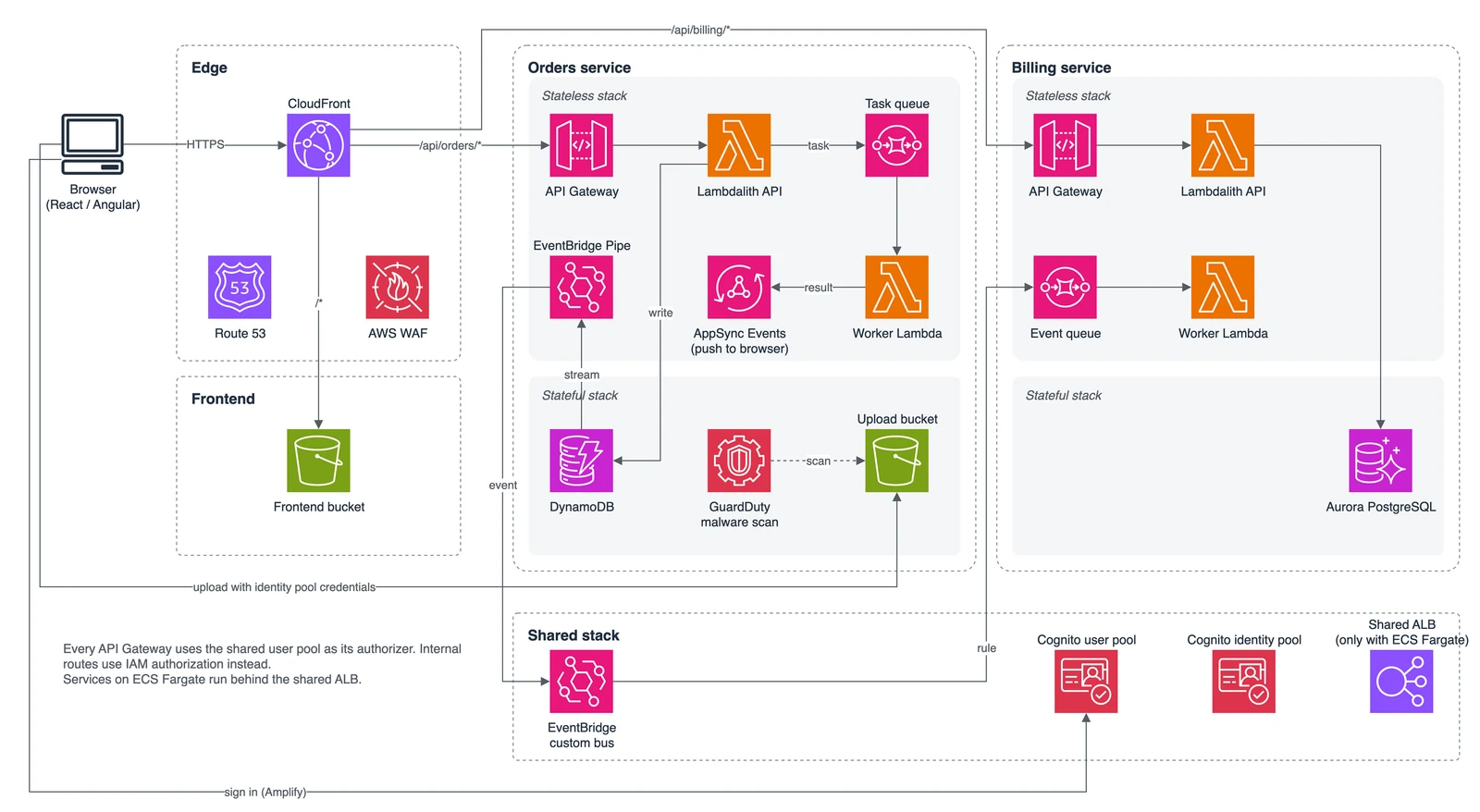
One API Gateway per Service
Each service has its own API Gateway. API Gateway costs per request, so five gateways with 100 requests each cost the same as one gateway with 500 requests. Separate gateways keep the services independent.
REST API or HTTP API depends on the project. REST APIs support a WAF on the API itself, private endpoints and timeouts over 29 seconds. HTTP APIs are cheaper, but their timeout is fixed at 30 seconds.
Internal routes for other services live in the same API Gateway, with IAM authorization instead of Cognito. If the customer requires it, internal calls go through a private API instead.
Frontend: One CloudFront for the App and the APIs
The frontend is a static build in S3, delivered by CloudFront with a WAF and a Route 53 domain. The APIs run behind the same CloudFront distribution, each under its own path: /api/orders/*, /api/billing/*.
The browser calls the APIs on the same domain as the frontend, so the APIs need no CORS and no preflight requests. Only the upload bucket needs a CORS rule. One WAF protects the frontend and all APIs.
One gap remains: each API Gateway stays reachable from the internet through its own URL, without the WAF. The token check still runs. If no request may bypass the WAF, CloudFront sends a secret header, and a WAF on the API Gateway checks it. This only works with REST APIs, and one regional web ACL can serve all of them.
The frontend gets its configuration at build time: the pipeline reads the Cognito IDs and the API paths from SSM or from pipeline variables.
Heavy Work Runs Async
The API itself stays thin. If a request starts work that takes longer, the API only triggers it and returns 202 Accepted:
- Within the service: a message to an SQS queue, consumed by another Lambda function of the same service.
- Complex workflows: a Step Functions state machine. How to start one from SQS, and where failed messages end up, is the topic of SQS to Step Functions: Pipes vs. Lambda.
- Another service is involved: an event on the EventBridge custom bus (see the next section).
AppSync Events is the best way to tell the frontend about the result. The browser subscribes to a channel, and the worker publishes the result to it. Like the API Gateway, each service that needs this has its own Events API. With few users and rare tasks, polling a status endpoint is enough.
This rule comes from a real problem. In one project, a request had to return a large amount of data without pagination, and it took longer than the 29-second timeout of API Gateway.
If an async answer is allowed, a worker exports the result to S3 and the frontend downloads the file. If not, the API runs on ECS Fargate.
When the API Runs on ECS Fargate
Some APIs don’t fit Lambda: steady high load all day, large request bodies, or answers that must come synchronously and take long. Then the same API runs on ECS Fargate behind an Application Load Balancer (ALB).
The limits compared:
| Limit | Lambda + API Gateway | ALB + ECS Fargate |
|---|---|---|
| Timeout | 29 seconds by default. Regional REST APIs: more by quota request. HTTP APIs: 30 seconds, fixed | ALB idle timeout, up to 4,000 seconds |
| Request body | 6 MB (Lambda), 10 MB (API Gateway) | No fixed limit |
| Response | 6 MB (Lambda), 10 MB (API Gateway). More with response streaming (REST APIs only) | No fixed limit |
Since the APIs run behind CloudFront, its origin response timeout applies too: 30 seconds by default, up to 120 seconds, and up to 180 seconds by quota request. So for long answers, Fargate raises the limit from 29 seconds to what CloudFront allows, not to the 4,000 seconds of the ALB. A Regional REST API with a raised timeout quota gets there too. Fargate is the clear choice for request bodies over 10 MB and for steady load.
With Fargate, a few things change:
- One shared ALB in the shared stack. Each service adds its own rule to it.
- The ALB verifies the JWT itself. The app still checks the custom attributes.
- There are no IAM-authorized routes. Internal calls go through events. A sync call can use a token from the Cognito client credentials flow, which the ALB verifies too.
- The service needs a VPC. NAT gateways or interface VPC endpoints cost money every hour, even without traffic.
- The ALB has no public endpoint. With CloudFront VPC origins, it stays internal.
Between Services: Events First
Services talk through events whenever possible. All services publish to one EventBridge custom bus in the shared stack. Every event uses the same envelope. The metadata part holds the event ID, type, version, timestamp and correlation ID, and the data part holds the payload. Yan Cui explains the reasons in this article.
The first event of a business process gets a new ID, and this ID is also the correlation ID. Every follow-up event gets its own ID, but keeps the correlation ID of the first one.
The event schemas live in the contracts package of the uv workspace. Producer and consumer import the same Pydantic models.
Events only change in an additive way: new fields are fine, but no field is ever removed or renamed. In the monorepo, one commit can change producer and consumer, but they still deploy one after the other. Additive changes keep both sides working in between, as long as consumers ignore unknown fields.
A synchronous call is the exception. I use it when a service would have to copy too much data from another service. Then it calls an internal route of the other service’s API Gateway, signed with IAM.
Save Data and Send the Event
A service often has to save data and publish an event about it. If the API does both, the two steps are not atomic. The data can be saved while the event is lost.
This happened in a project with Aurora PostgreSQL. The fix was the outbox pattern. The API writes the event into an outbox table, in the same transaction as the data. A Lambda function runs on a schedule, sends the new rows to the bus and marks them as published.
With DynamoDB, DynamoDB Streams does this job. The API writes only to the table. An EventBridge Pipe reads each change from the stream, and a small enrichment Lambda function builds the event with the models from contracts. So the table layout doesn’t become the event contract:
flowchart LR
  API[API Lambda] -->|write item| DDB[(DynamoDB)]
  DDB -->|stream| Pipe[EventBridge Pipe]
  Pipe <-->|build envelope| Enrich[Enrichment Lambda]
  Pipe -->|event| Bus[Custom bus]
  Bus -->|rule| Queue[SQS queue of another service]
  Pipe -.->|failed| DLQ[DLQ]
The stream record only contains the item. So the API must store the correlation ID in the item, or the event loses it.
Both ways deliver an event at least once, and so does EventBridge. Every consumer must handle the same event twice, for example with the idempotency utility of Powertools.
Auth: One User Pool, Two Checks
The shared stack holds one Cognito user pool and one identity pool for all services. The frontend uses only the Amplify library, not the rest of Amplify. Users sign in with users in Cognito, or through Entra ID as a SAML provider. (A Python script can sign in through the same setup: see Cognito SAML Auth from a Python Script.)
The frontend sends the ID token to the API Gateway of each service. Authorization happens in two steps:
- The Cognito authorizer of the API Gateway checks that the token is valid. A REST API authorizer without OAuth scopes expects the ID token, not the access token (Cognito docs).
- The endpoint checks the custom attributes in the token, for example a role or a tenant. It decides whether this user may call it.
The user must not be able to change these attributes. This is easy to get wrong:
- Attributes from Entra ID: Cognito updates mapped attributes at every sign-in, so the app client must have write access to them. A user could then change them with
UpdateUserAttributesuntil the next sign-in. To prevent this, the app client must not allow theaws.cognito.signin.user.adminscope, as the AWS Security Blog recommends. - Attributes set by the backend: Remove them from the app client’s write attributes. The backend can still set them, because
AdminUpdateUserAttributesignores the app client’s settings. In CDK, an app client can write all attributes by default.
File Uploads: Straight to S3
Files don’t go through the API. Instead, the identity pool gives each signed-in user temporary AWS credentials, and the browser uploads with the S3 API directly.
I prefer this to presigned URLs. No Lambda function has to create the URLs, and the rules for who may write where live in one IAM policy, not in code. Also, there is no URL that works for anyone who has it until it expires.
The role’s policy limits where a user can write, for example to a prefix with the user’s identity ID. If a use case needs more, the identity pool turns custom attributes into principal tags, for example a tenant. Principal tags are session tags on the temporary credentials, and the policy can check them. They are only safe if the user can’t change the attributes (see above).
GuardDuty Malware Protection for S3 scans every new object. A lifecycle rule deletes uploads that were never processed.
Data: DynamoDB First
DynamoDB is my default when the query patterns are clear and limited. When they aren’t, I use Aurora PostgreSQL with SQLModel. Each API endpoint uses either the reader or the writer endpoint. With many parallel calls, RDS Proxy runs in front of the cluster.
The reader endpoint has one trap: replicas lag slightly behind the writer. A GET right after a POST may not see the new data yet. Endpoints that read their own writes should use the writer.
Schema migrations run in a Lambda function that the pipeline calls after the stateful deploy. The old version of the API keeps running during the migration. So migrations follow the same rule as events: add first, and remove only when nothing uses the old column anymore.
Stacks: Shared, Stateful, Stateless
Each service has two CDK stacks:
- Stateful: everything that holds data: DynamoDB tables, S3 buckets, Aurora, and the DLQs, because they hold failed messages. The custom domain name of the API belongs here too, so its URL stays the same when the stateless stack creates the API again.
- Stateless: everything that can be deleted and created again at any time: Lambda functions, SQS queues, the API Gateway.
The shared stack holds what all services use: the user pool, the identity pool and the event bus. If a service runs on Fargate, the shared ALB lives here too.
The stateless stack finds the stateful resources through SSM parameters, not through CloudFormation exports. This also comes from a blocked deploy. A resource in the stateful stack changed, and CloudFormation refused to update the export, because the stateless stack still imported it. SSM parameters don’t lock anything.
All data resources are kept when their stack is deleted. The user pool also has deletion protection, and the shared and stateful stacks have termination protection. Some changes to a user pool make CloudFormation replace it, and a new user pool has no users.
The split also protects against refactoring mistakes. In one project, a construct ID changed during a refactoring, and CloudFormation would have replaced the resource with a new, empty one. cdk diff showed the replacement before the deploy. Since then, the pipeline shows the diff of the stateful stacks before each deploy.
Delivery: One Account per Stage
Each stage has its own AWS account. The CI pipeline deploys with an OIDC role, so there are no long-lived keys.
Path filters deploy only the services that changed. A change in contracts or another shared package must deploy every service that depends on it. The uv workspace knows these dependencies, so the pipeline can derive the list from it.
A stack per developer would be nice, but most projects share one dev stage because of the cost. Lambda, API Gateway and DynamoDB cost almost nothing when nobody uses them. NAT gateways, RDS Proxy and Aurora cost money every hour. Aurora Serverless v2 can pause, but not behind RDS Proxy.
Observability: One Correlation ID
Each business process has one correlation ID: the ID of its first event. The API creates it at the start of the first request, so even the log lines before the first event have it.
Powertools Logger writes it into every log line, and every follow-up event carries it on. With it, CloudWatch Logs Insights finds every log line of one business process across all services. X-Ray adds the latencies and the service map.
Every service gets the same alarms: Lambda errors and throttles, API Gateway 5xx and latency, and the depth of every DLQ. That includes the DLQs of EventBridge rules and pipes, which are easy to forget.
When I’d Do It Differently
- A small team with one product. One service with one Lambdalith is enough. The business areas still get their own uv packages, so one can become a service later.
- A public frontend that must rank in search engines, like a shop. A single-page app in S3 isn’t enough. It needs server-side rendering (Next.js, Angular SSR) on Lambda, ECS Fargate or Amplify Hosting.
- Tenant isolation. If tenants may share tables, Aurora PostgreSQL with row-level security (RLS) keeps their rows apart. The API passes the tenant from the token to the database. The database then filters every query, even if the code forgets a
WHEREclause. Behind RDS Proxy, setting the tenant per request pins the connection, so the proxy pools much less. If tenants must not share resources at all, each tenant gets its own stack or account.
Limitations and Trade-offs
- This post describes decisions from my projects, not measurements.
- Events first means eventual consistency. A service sees the changes of another service with a short delay.
- The ID token works well for the two checks. If you need OAuth scopes per endpoint, use the access token instead.
- IAM can’t limit the size or the content type of an upload. If that matters, the processing step must check it.
- A shared dev stage is cheaper, but developers can overwrite each other’s deploys.
- If a work queue in the stateless stack is deleted or replaced, the messages still in it are lost.
- SSM parameters lock nothing. CloudFormation doesn’t stop you from deleting a resource that another stack still uses, and the stateless stack reads a changed value only at its next deploy.
Wrapping Up
- Cut services by bounded context. Services that are too small call each other all the time. When in doubt, start with fewer services.
- Link stacks through SSM, not through exports. Exports blocked two of my deploys, once through a shared layer.
- Publish events through a DynamoDB stream or an outbox, not with a second write from the API.
- Keep the authorization attributes out of the user’s reach. No
aws.cognito.signin.user.adminscope, and no write access to attributes that the backend sets. - Check the diff of the stateful stacks before each deploy. A changed construct ID can replace a resource with an empty one.
Further reading:
- EventBridge best practice: why you should wrap events in event envelopes by Yan Cui
- Accessing resources with API Gateway after sign-in: AWS documentation
- Role-based access control using Amazon Cognito and an external identity provider: AWS Security Blog