Cognito SAML Auth from a Python Script — No Web App Required
You’ve got a Python script that needs to call an API behind AWS Cognito with Entra ID as the SAML identity provider. There’s no browser, no frontend, no Amplify — just your script and a terminal. Now what?
Almost every similar example out there assumes you’re building a web app with a Hosted UI. That’s great if you have a web app. I didn’t. I had a data migration script — it needed to call an API Gateway endpoint behind a Cognito authorizer and push large files directly to S3. No frontend, no Amplify, just a script and a terminal. I spent an embarrassing amount of time convinced there was a simpler way before landing on this.
The trick? Spin up a throwaway HTTP server on localhost, use it as the OAuth callback, and let the browser handle the SAML dance.
What You’ll Need
Before we start, make sure you have:
- Python 3.10+
- requests library —
pip install requests - A configured Cognito User Pool with:
- App client ID (no client secret for this example — see the note at the end if you need one)
- Cognito Domain (e.g.,
https://your-domain.auth.us-east-1.amazoncognito.com) - Callback URL set to
http://localhost:8080 - EntraID selected as the identity provider
- Authorization code grant enabled
The OAuth Flow at a Glance
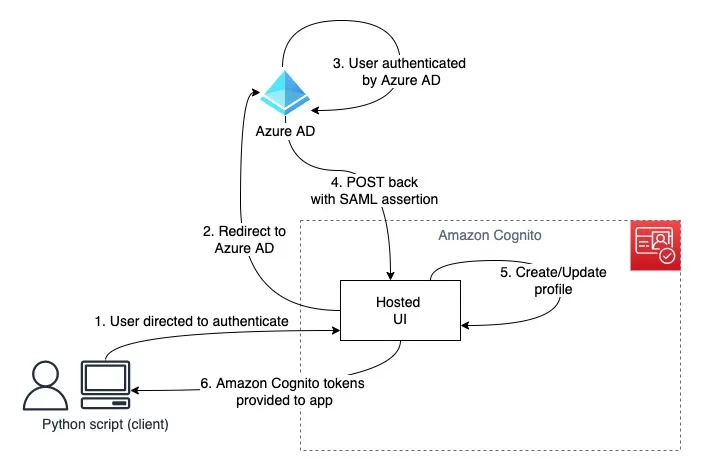
Here’s what happens when you run the script. The key insight is that localhost:8080 acts as our temporary “web app” — just long enough to catch the callback.
sequenceDiagram
    participant S as Script
    participant B as Browser
    participant E as Entra ID
    participant C as Cognito

    S->>B: Open /oauth2/authorize URL
    B->>C: GET /oauth2/authorize
    C-->>B: SAML redirect
    B->>E: Login form
    E-->>B: Credentials entered
    B->>E: Submit credentials
    E->>C: SAML assertion
    C-->>B: Redirect to localhost:8080?code=AUTH_CODE
    B->>S: GET /?code=AUTH_CODE
    S->>C: POST /oauth2/token (code + client_id)
    C-->>S: { id_token, access_token, refresh_token }
Two Cognito endpoints matter here:
/oauth2/authorize— kicks off the flow, redirects the user through Entra ID/oauth2/token— exchanges the authorization code for actual tokens
The Trick: localhost as a Callback
OAuth2 requires a redirect URI — somewhere for Cognito to send the authorization code after the user logs in. Web apps have a route for this. We don’t.
But nothing says the redirect URI has to be a real web server. Python’s built-in http.server gives us everything we need: start a server, wait for exactly one request, grab the auth code from the query string, and shut down. Cognito doesn’t care that it’s talking to a five-line HTTP handler on your laptop.
Building It Piece by Piece
Let’s walk through the implementation. I’ll break it into logical chunks — the full script is in the repo if you want to grab it all at once.
Configuration and Token Container
First, the boring-but-important setup. Replace the placeholder values with your Cognito details:
from dataclasses import dataclassfrom http.server import BaseHTTPRequestHandler, HTTPServerfrom urllib.parse import parse_qs, urlparsefrom webbrowser import open_new
import requests
PORT = 8080REDIRECT_URL = f'http://localhost:{PORT}'
COGNITO_CLIENT_ID = '<YOUR_COGNITO_CLIENT_ID>'  # e.g., 1h57kf5cpq17m0eml12EXAMPLECOGNITO_DOMAIN = '<YOUR_COGNITO_DOMAIN>'  # e.g., https://your-domain.auth.us-east-1.amazoncognito.com
TOKEN_URL = f'{COGNITO_DOMAIN}/oauth2/token'AUTHORIZE_URL = (    f'{COGNITO_DOMAIN}/oauth2/authorize'    f'?client_id={COGNITO_CLIENT_ID}'    f'&redirect_uri={REDIRECT_URL}'    f'&response_type=code'    f'&scope=openid+profile+email')

@dataclass(frozen=True)class CognitoTokens:    """Container for OAuth2 tokens returned by Cognito."""    id_token: str    access_token: str    refresh_token: str    expires_in_seconds: int
Nothing fancy — a frozen dataclass to hold the tokens so we don’t accidentally mutate them later.
The Callback Handler
This is where the magic happens. When Cognito redirects the browser to localhost:8080?code=XXXXX, this handler catches the request, extracts the code, and immediately exchanges it for tokens:
class CognitoHTTPServerHandler(BaseHTTPRequestHandler):    """HTTP request handler that captures OAuth2 authorization code."""
    def do_GET(self):        self.send_response(200)        self.send_header('Content-type', 'text/html')        self.end_headers()
        parsed_url = urlparse(self.path)        query_params = parse_qs(parsed_url.query)
        if 'code' in query_params:            auth_code = query_params['code'][0]            self.wfile.write(                bytes(                    '<html><h1>Authentication successful!</h1>'                    '<p>You may now close this window.</p></html>',                    'utf-8'                )            )            self.server.tokens = self._exchange_code_for_tokens(auth_code)  # type: ignore        else:            self.wfile.write(                bytes(                    '<html><h1>Authentication failed</h1>'                    '<p>No authorization code received.</p></html>',                    'utf-8'                )            )
    def log_message(self, format, *args):        """Suppress HTTP server logs for cleaner output."""        return
One gotcha here: self.server is typed as HTTPServer by default, not our custom subclass. The # type: ignore is intentional — we’re stashing the tokens on the server instance so the calling code can retrieve them after handle_request() returns.
Token Exchange
The authorization code by itself is useless. We need to exchange it for real tokens via Cognito’s token endpoint. This is a straightforward POST with the code, client ID, and redirect URI:
    def _exchange_code_for_tokens(self, code: str) -> CognitoTokens:        body = {            'grant_type': 'authorization_code',            'client_id': COGNITO_CLIENT_ID,            'code': code,            'redirect_uri': REDIRECT_URL        }        response = requests.post(            TOKEN_URL,            data=body,            headers={'Content-Type': 'application/x-www-form-urlencoded'},            timeout=10        )        response.raise_for_status()
        response_body = response.json()        return CognitoTokens(            id_token=response_body['id_token'],            access_token=response_body['access_token'],            refresh_token=response_body['refresh_token'],            expires_in_seconds=response_body['expires_in'],        )
The Content-Type: application/x-www-form-urlencoded header is important — Cognito won’t accept JSON here.
Putting It Together
The orchestrator spins up the server, opens the browser, waits for the callback, and returns the tokens:
class CognitoHTTPServer(HTTPServer):    """Custom HTTPServer with tokens attribute."""    tokens: CognitoTokens | None = None

class CognitoTokenHandler:    def get_tokens(self) -> CognitoTokens:        open_new(AUTHORIZE_URL)        print(f"Waiting for authentication callback on {REDIRECT_URL}...")
        http_server = CognitoHTTPServer(('localhost', PORT), CognitoHTTPServerHandler)        http_server.handle_request()  # blocks until one request is handled
        if http_server.tokens is None:            raise RuntimeError("Failed to retrieve tokens from Cognito.")        return http_server.tokens

if __name__ == '__main__':    token_handler = CognitoTokenHandler()    tokens = token_handler.get_tokens()
    print('\n' + '='*80)    print('Authentication Successful!')    print('='*80)    print(f'\nID Token:\n{tokens.id_token}')    print(f'\nAccess Token:\n{tokens.access_token}')    print(f'\nRefresh Token:\n{tokens.refresh_token}')    print(f'\nExpires in: {tokens.expires_in_seconds} seconds')
handle_request() is the key — it processes exactly one HTTP request and returns. No event loop, no graceful shutdown needed. The server starts, catches the callback, and gets out of the way.
What About Client Secrets?
If your Cognito App Client has a client secret configured, you’ll need to add a Base64-encoded Authorization header to the token exchange request:
import base64
credentials = f'{COGNITO_CLIENT_ID}:{COGNITO_CLIENT_SECRET}'encoded = base64.b64encode(credentials.encode()).decode()
response = requests.post(    TOKEN_URL,    data=body,    headers={        'Content-Type': 'application/x-www-form-urlencoded',        'Authorization': f'Basic {encoded}',    },    timeout=10)
Where to Go from Here
At this point your script can authenticate a real user through Entra ID and walk away with valid Cognito tokens. A few natural next steps:
- Cache the refresh token — store it locally and use it to get new access tokens silently, so users don’t have to re-authenticate every run
- Wrap it in a CLI with
clickortyperand distribute it to your team - Call API Gateway — pass the ID token in the
Authorizationheader to hit endpoints protected by a Cognito authorizer - Get temporary AWS credentials — exchange the ID token with a Cognito Identity Pool (
GetId+GetCredentialsForIdentity) to assume an IAM role and call AWS services directly
The full source code is in the GitHub repo.